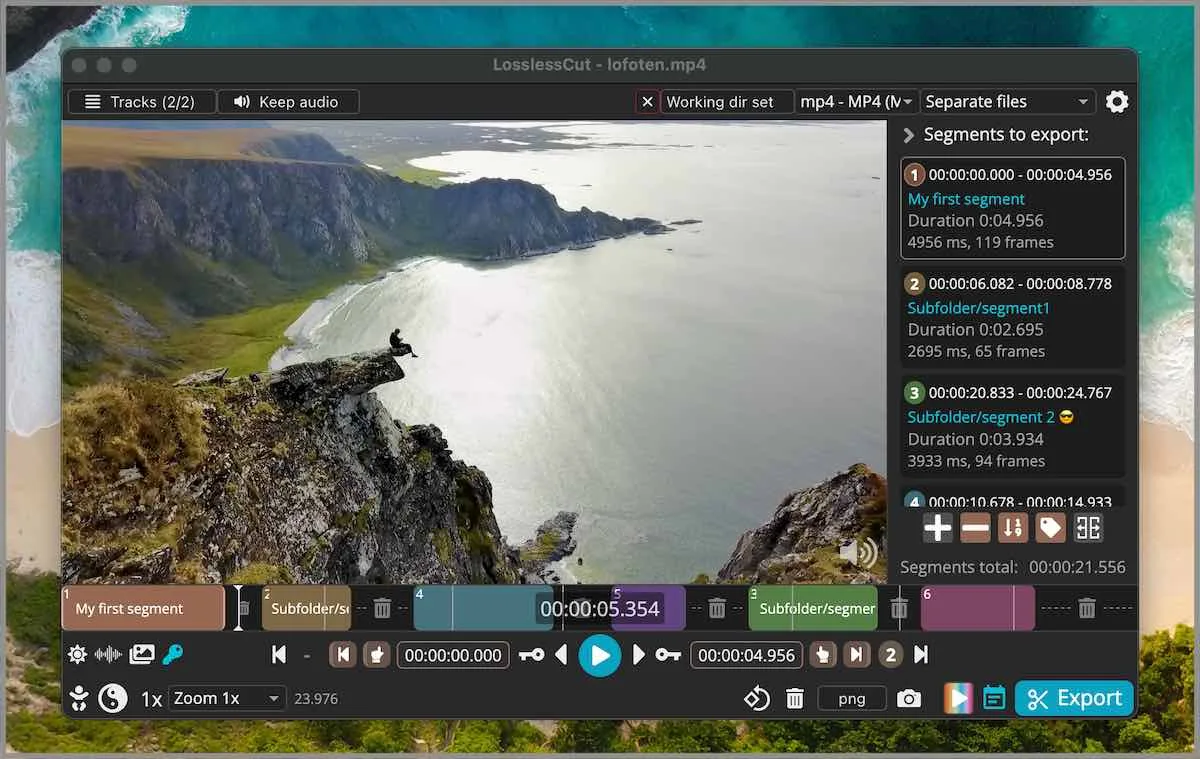
Three migrate sources show up again and again. Phone editors such as CapCut want another encode after you already exported. HandBrake users compress first, then discover they still need to drop a head and a tail. FFmpeg one-liner users already know -c copy and want a preview for in and out points. A longer walk sits on switch from re-encode editors. Compare pages stay honest: versus HandBrake and versus Shotcut.
Cut first, encode later
A lossless cut copies the existing bitstream. Quality stays. Time stays short. File size stays close to the source portion you kept. A re-encode compresses or applies effects and pays for that with time, heat, and a generation of quality loss. If you only need to drop the first twelve seconds of a camera file, codec copy is the job. If you need a smaller file for email, HandBrake is the job, and it should run after the cut so you are not compressing minutes you will delete.
The default cut is keyframe-aligned. The in-point can land on a keyframe and leave extra frames. That is not a re-encode. Smart cut is experimental and tries to re-encode only a small part so the in-point is closer to the frame you marked. Leave smart cut off until you have read smart cut and keyframe cuts.
Leaving a phone editor
Export the file from CapCut or the phone editor. Open that file locally. Mark in and out points. Export those portions. The GitHub build does not ask for an account. Files stay on the PC. You give up cloud templates, captions-as-a-service, and phone-first effects. You keep the camera quality you already paid for on disk. If the phone editor is the only place the project still exists, export a high-quality file first. Cutting a compressed share file is how people invent a quality complaint that started on the phone.
Install on the desktop from GitHub. Windows: extract LosslessCut-win-x64.7z with 7-Zip. macOS: mount the arm64 or x64 dmg. Linux: run the AppImage or unpack the tar.bz2. Store listings and Snap stay supporting. There is no official winget id. These notes print no brew command. Short OS map: files for this computer.
Breaking the HandBrake habit
HandBrake is a re-encode transcoder. It is open source under GPL. It is the right tool when you want a smaller file or a different codec. It is the wrong tool when you only want to drop heads and tails. The combined workflow is cut locally first, then open the shorter file in HandBrake only if you still need a smaller file. That order saves encode time and keeps the archive copy closer to camera quality.
Do not title either tool as the best anything. They do different jobs. Official HandBrake site stays HandBrake. Official LosslessCut homepage stays losslesscut.app. Files for LosslessCut still come from GitHub. See also trim video for the simple head-and-tail case and mp4 trimmer when the container is mp4.
When FFmpeg on the command line is enough
FFmpeg is the engine LosslessCut wraps. The same lossless idea is -c copy with in and out times. The GUI is for people who want to preview those points, keep a list of segments, and export them without writing a one-liner. If you already live in FFmpeg, you do not have to move. If you want a visual in-point, the GitHub app is the wrapper. CLI and HTTP API exist in the repo docs and are basic. They are not a batch farm.
A separate FFmpeg install is not required to run LosslessCut. FFmpeg is bundled. Licence for LosslessCut is GNU GPL-2.0. FFmpeg donations are pointed from the README. Author donations sit on PayPal and mifi.no/thanks.
What still needs a re-encode
Effects, titles, frame blending, a new frame rate, a new codec, and a smaller file all need a re-encode. Shotcut is an open source NLE for that class of work. Resize, stretch, and filters inside LosslessCut still re-encode. Lossless crop exists when the app actually copies the bitstream; the FAQ still hedges crop, resize, and stretch with issue 372. Write both. Crop details: video cropper.
Avidemux is a closer cousin: a linear cut and filter GUI, also GPL. It still often re-encodes for filters. Premiere is not the comparison. LosslessCut is not an NLE. Segments on a timeline, export those portions. If the job is a feature edit with a grade, stay in the NLE. If the job is a camera file with dead time at both ends, move the cut here first.
Merge, crop, and keyframe honesty
Two camera files can merge when codec parameters match. That is concat, not a dissolve. Read merge video segments before you expect a crossfade. .llc project files can save segments next to the media and can be turned off. Default cuts land on keyframes. Extra frames at the in-point are normal for codec copy. Audio can skip at a cut when the audio keyframe does not match the video keyframe. Smart cut tries to shrink that gap and is experimental.
| Current habit | Move | Keep the old tool for |
|---|---|---|
| CapCut or a phone editor | Export the file, open it locally, cut with codec copy | Captions, templates, phone-first effects |
| HandBrake, then a second trim | Cut first, encode the shorter file later | Compress-for-size, codec change |
| FFmpeg one-liners | Use the GUI only when you want a visual in-point | Scripted -c copy on a known timestamp |
| Shotcut for a two-second trim | Open the file here, export the portion | Effects, titles, a real timeline |
| Store or Snap install already on the PC | Prefer GitHub 7z, dmg, or AppImage for the current tag | Store auto-update if that login is the point |
A short move plan
One session is enough for a first file. Install from GitHub using the OS guide: Windows 7z, macOS dmg, or Linux AppImage. Open the exported camera file. Mark segments. Export. Compare the output to the source on disk. If the in-point is early, that is keyframe alignment, not a failed install. If you still need a smaller file, open the shorter output in HandBrake. If you still need titles, open the shorter output in Shotcut.
GitHub executables stay free. Store listings lag and exist as a paid convenience path; these notes do not invent a price. Snap on Linux is supporting. Mixing three channels on one login creates two copies. Pick GitHub unless the store account is the point. Channel notes: 7z or store.
Where to read next
Guides index: guides. Safe fetch: download safely. Releases: releases. Cutter definition: video cutter. Safety: is it safe. Licence is GNU GPL-2.0 on the repo LICENSE. Settings stay in the OS appData folder for LosslessCut. GitHub builds run locally and do not ask for an account. These notes invent no telemetry claim and no audit. Official homepage remains losslesscut.app. Requirements map: this computer.
Publisher: about. How a review date works: editorial policy. Ads stay off: advertising disclosure.