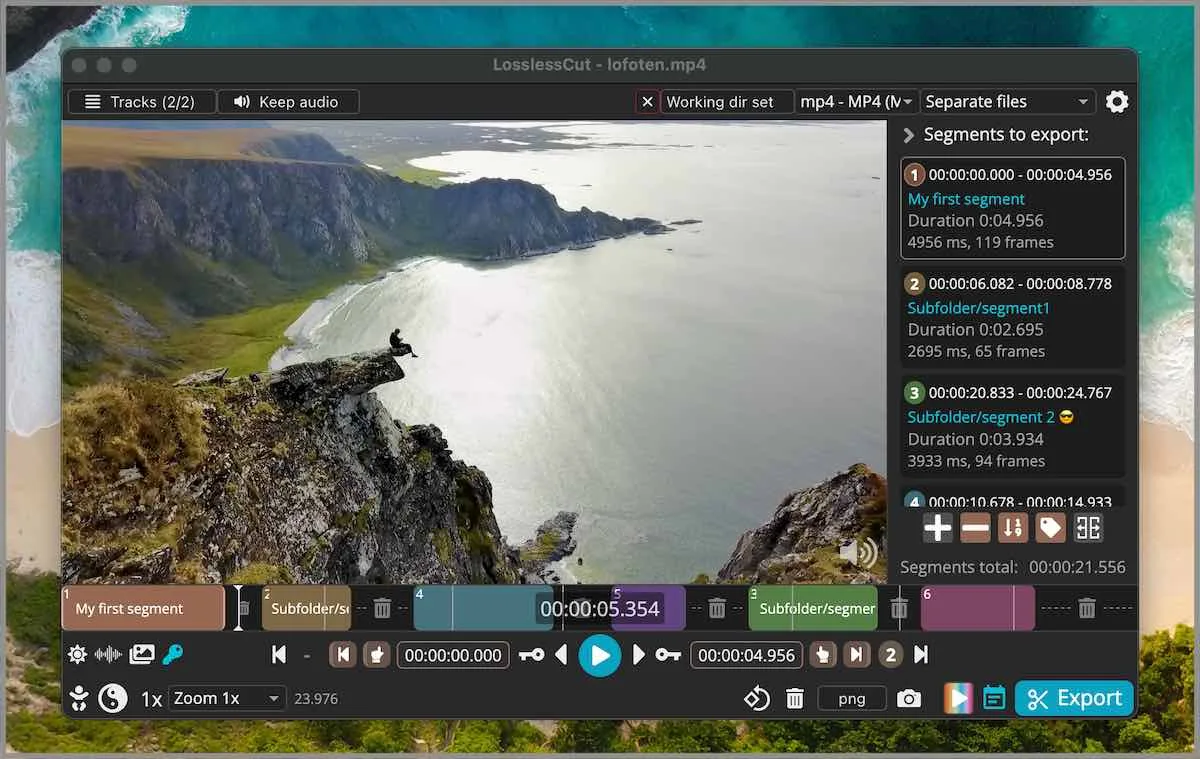
Start with the machine in front of you. If the goal is to run the app today, use an install path for Windows, macOS, or Linux. If the goal is to decide between this project and HandBrake or Shotcut, use a compare guide. If the goal is to stop sending a finished file through another encode just to drop a few seconds, use the migrate notes. If the goal is one job such as a keyframe cut or a merge, use a howto. Home keeps the short path at the video trimmer home.
When a guide names a file, that filename was checked against the LosslessCut README Download section and GitHub Releases on 2026-09-02. Release numbers are not typed here. The current tag is injected at build from GitHub. If a filename on GitHub Releases does not match the pattern in releases, wait and read the official list. If a search result wants a helper from Softonic or CNET, stop and use download safely instead.
How to pick a guide
Name the operating system and the next action in one sentence. Extract the Windows 7z with 7-Zip, then run LosslessCut.exe. Mount the macOS dmg and drag the app to Applications. Run the Linux AppImage, or unpack the tar.bz2. See how this project differs from HandBrake. Stop sending a finished file through CapCut for another encode. Cut on a keyframe. If you can say that sentence, open the matching URL below. If you cannot, read the section intros, then pick the shortest match. One official channel is enough. Mixing a Store build, a Snap, and a loose AppImage on the same login is how two copies fight.
A useful second test: is the job a lossless cut of a file you already have, a compress-for-size pass, or a full timeline with effects. Lossless cut is this project. Compress-for-size is HandBrake. A timeline with effects is Shotcut. The compare guides say that without inventing a rank. Official product homepage remains losslesscut.app. Files still come from GitHub. Source, licence, and the README live on the GitHub notes.
Keep these URLs indexed
These paths already exist and stay indexed. They cover the daily definition, GitHub, the current tag, a safe fetch, crop, cut, trim, and mp4. Other notes sit beside them and do not replace them.
- Home, definition, and the short install path for each OS.
- Releases, which 7z, dmg, AppImage, or tar to take.
- GitHub, repo mifi/lossless-cut, GPL-2.0.
- Download safely, GitHub first, skip wrappers.
- Video cropper, lossless crop when the bitstream copies; resize still re-encodes.
- Video cutter, in and out points on a local file.
- Trim video, drop heads and tails without a second encode.
- MP4 trimmer, the same codec-copy job on an mp4 container.
Install, compare, migrate, and howto
Each title is its own URL. Install guides assume the machine in front of you. Compare guides link the vendor site they checked on 2026-09-02. Migrate means export the file you already have, then cut locally. Howto pages walk one job. There is no official WinGet id. These notes print no brew command. Linux primary is the GitHub AppImage or tar. Snap is supporting.
- Extract a video trimmer on Windows
- Install a video trimmer on macOS
- Install a video trimmer on Linux
- GitHub 7z or a store listing
- Video trimmer vs HandBrake
- Video trimmer vs Shotcut
- Switch from re-encode editors
- Is a video trimmer safe
- Lossless smart cut
- Merge video segments
- Keyframe cuts
Notes next to the guides
Nearby notes sit beside that list. Releases answers which file. This computer is the requirements map for Windows 7z, macOS dmg, and Linux AppImage. Re-encoders is the migrate page for HandBrake and CapCut habits. Legal pages are separate.
| If you have | Open | Official path |
|---|---|---|
| A Windows 10 or 11 x64 PC | Windows extract or this computer | LosslessCut-win-x64.7z from GitHub, extract with 7-Zip |
| A Mac on Apple Silicon or Intel | macOS install | arm64 or x64 dmg from GitHub. PKG does not work. |
| A current 64-bit Linux box | Linux install | Snap id losslesscut, or the GitHub AppImage |
| A choice between GitHub and a store | 7z or store | GitHub stays free. Store listings lag. |
| HandBrake already in the workflow | versus HandBrake or move off re-encoders | Cut first, encode later only if you need a smaller file |
| Need the current asset name | releases | 7z, dmg, AppImage, tar.bz2 on the current tag |
Publisher notes: about. Editorial practice: editorial policy. Contact, privacy, and advertising disclosure complete the legal set.
GitHub files those guides share
Windows takes LosslessCut-win-x64.7z. Extract it with 7-Zip, then run LosslessCut.exe. There is no Windows installer. The APPX on the tag is Store packaging and does not work as a manual download. Microsoft Store listing 9P30LSR4705L exists as a supporting path and lags GitHub.
macOS takes LosslessCut-mac-arm64.dmg or LosslessCut-mac-x64.dmg. Mount, drag to Applications. The PKG on the tag does not work. Mac App Store listing id1505323402 is supporting and lags GitHub.
Linux Snap id losslesscut is supporting. GitHub ships LosslessCut-linux-x86_64.AppImage and tar.bz2 archives, including arm64 and armv7l. Flathub is unofficial. Flathub is unofficial and is not mapped. Nightly builds are not the path these notes map.
What a default cut does
The README calls LosslessCut a cross platform FFmpeg GUI and a swiss army knife of lossless video and audio editing. The default cut is keyframe-aligned codec copy. That is fast and keeps quality. It can leave extra frames at the in-point. Smart cut is experimental and tries to re-encode only a small part so the in-point lands closer to the frame you marked. The app is not an NLE. Segments sit on a timeline; export those portions. It is not Premiere. FFmpeg is bundled. A separate FFmpeg install is not required.
Lossless crop exists when the app actually copies the bitstream. Resize, stretch, and filters still re-encode. The FAQ still hedges crop with issue 372. Merge works when codec parameters match. Project files with a .llc suffix can save segments next to the media and can be turned off in settings. Settings live under the OS appData path for LosslessCut. GitHub builds do not ask for an account. Files stay on the PC.
Store listings versus GitHub files
GitHub executables stay free. Mac App Store and Microsoft Store listings exist as a paid convenience path the author describes, with auto-update, and with versions that lag GitHub. These notes do not invent a dollar amount. Snap is the Linux store path the author publishes. Choose GitHub when you want the current tag. Choose a store only when that store login is the point. Read the channel guide at GitHub files versus store apps before mixing both.
Licence is GNU GPL-2.0. Link the LICENSE file on master, not a third-party mirror. Donations for the author sit on PayPal and on mifi.no/thanks. The README also points at FFmpeg donations. None of those links are ads on these pages. Ads stay off. See advertising disclosure.
Questions before you pick
If the question is which file to take, open releases. If the question is whether the 7z is safe, open the safe-download notes and the GitHub repo. If the question is HandBrake, remember compress and codec copy are different jobs. If the question is Shotcut, remember effects need a re-encode. If the question is CapCut, export the file, then cut locally. If the question is a store listing, treat it as supporting. If the question is Snap on Linux, use the official command above. The AppImage is the GitHub file on the same tag.
Requirements assume current Windows 10 or 11 x64, current macOS on Intel or Apple Silicon, or current 64-bit Linux. Windows 7, 8, and 8.1 are no longer supported. 32-bit Linux is no longer supported. Older macOS lines drop when Electron drops them. Windows ARM may lack a default 7z on a given tag; read the asset list rather than inventing a filename. Portable Windows is an empty config.json next to LosslessCut.exe. Uninstall means delete the extracted folder and, if you want a clean profile, the appData folder. Details sit on the computer map.
Install by operating system
Step-by-step installs with the exact file for Windows, macOS, and Linux.
- Extract on Windows Extract a free video trimmer on Windows from the official GitHub 7z. Use 7-Zip, run the exe, skip APPX and wrapper sites. Current release, local files.
- Install on macOS Install a free video trimmer on a Mac from the official GitHub dmg. Apple Silicon or Intel. Skip the PKG. Store listings lag GitHub. Local files.
- Install on Linux Install a free video trimmer on Linux from GitHub AppImage or official Snap. Flathub is unofficial. Current 64-bit Linux, local files.
- 7z or store Take GitHub 7z, dmg, or AppImage for a current free video trimmer. Store and Snap listings lag. Skip APPX and PKG. GitHub stays free. No invented prices.
Comparisons
This app against the other editors people ask about.
- vs HandBrake A lossless video trimmer copies the bitstream. HandBrake re-encodes and compresses. Cut first, encode later only if the file still has to shrink. Honest split.
- vs Shotcut Compare a lossless local cutter with Shotcut. One copies bitstreams on a segment timeline. Shotcut is a full NLE with effects and a re-encode.
Switch and import
Leave re-encode habits and cut locally with codec copy.
Cuts and safety
Safe download, smart cut, merge, and keyframe alignment.
- Is it safe A local cutter is safe when the file comes from GitHub Releases. Skip Softonic and CNET wrappers. License is GPL-2.0. No account. Cuts stay on the PC.
- Lossless smart cut Smart cut is experimental. Default export is a keyframe codec-copy cut. A small re-encode tries to hide extra frames at the in-point. Local files.
- Merge video segments Merge camera segments locally with codec copy when codec params match. Concat fails if resolution, timebase, or codec differ. GitHub stays free.
- Keyframe cuts Default cuts land on keyframes because codec copy cannot start mid-GOP. Extra frames at the in-point are expected. Smart cut is experimental. Local files.