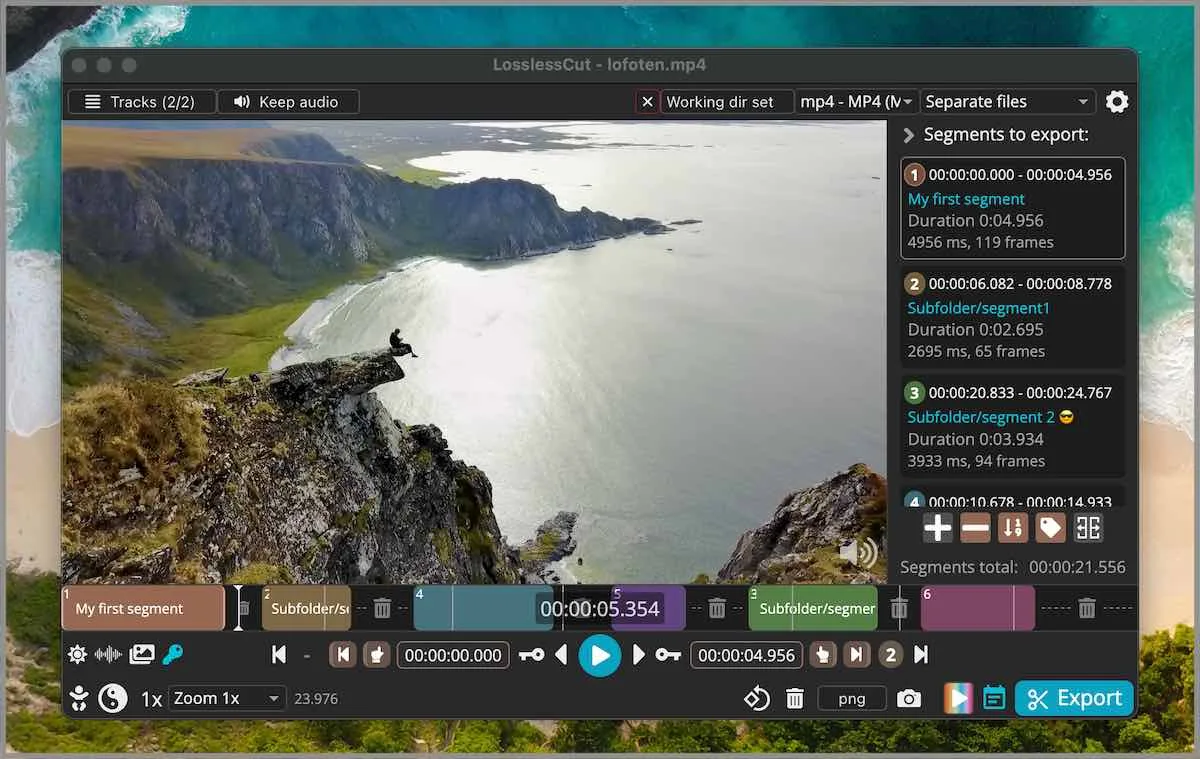
Codec copy starts on a keyframe
A lossless cut copies the bitstream. Video is stored in groups of pictures. A keyframe, also called an I-frame, is the start of a group. Later frames in that group are predicted from it. Codec copy can only begin at a keyframe because a predicted frame is useless without the frames it depends on. Related: smart cut, guides, home, trim video. Product homepage: losslesscut.app. License: GPL-2.0.
FFmpeg -c copy has the same rule. The GUI shows you the timeline so the extra frames are visible before you export a keep file.
Why extra frames sit at the in-point
If you mark an in-point between keyframes, the export still starts at the previous keyframe. Every frame from that keyframe up to the frame you wanted is copied. Those are the extra frames. They are not a failed 7z extract and not a bad dmg. They are the GOP.
The out-point is often closer to the frame you marked, because the encoder can stop after a packet without starting a new group. The in-point is the hard one. Camera files with long GOP spacing leave more extra frames. Screen recordings with frequent keyframes leave fewer.
That is why a mark at 00:00:10:12 can export from 00:00:08:00 if the previous keyframe sat there. You are not losing the later frames. You are keeping a few earlier ones. People who need the extra frames gone have to re-encode at least that opening GOP. That is smart cut, and it is experimental. People who need a device-sized file anyway can cut lossless first, then run HandBrake on the short result so the encoder never sees the discarded tail.
A long-GOP camera file (many predicted frames between I-frames) shows the trade clearly. Open a throwaway. Mark an in-point a few frames after a keyframe. Export. Play from the start. The extra frames are the proof, not a bug in the 7z or the dmg.
Extra frames are expected
Play the export. If those frames matter, you have three honest options: live with them, cut later on a later keyframe, or try experimental smart cut on a throwaway. Smart cut re-encodes a small part. README and issue 126 mark it experimental.
Audio skip at the cut is a sibling seam. Play audio across the join. Notes skip promising a silent splice on every codec. Keep the original camera file until you decide.
Container choice after the cut is still mp4 or mkv based on the source and what the app will write. Notes skip inventing a hidden transcode that also fixes the GOP.
Smart cut is the experimental escape
Smart cut tries to hide extra frames by re-encoding a small part, then copying the rest. Test a throwaway. Keep the original. Wedding files are keep files. Guide: smart cut. Merge of several keyframe cuts: merge segments. Concat of those cuts still needs identical codec params.
HandBrake will re-encode the whole file and can start on the exact frame. That is compress, not codec copy: versus HandBrake. Shotcut will re-encode a timeline: versus Shotcut. Pick the job.
| Need | Use | Cost |
|---|---|---|
| Fast lossless trim | Default keyframe cut | Extra frames at in-point |
| Tighter in-point | Experimental smart cut | Small re-encode. Can fail. Issue 126. |
| Exact frame plus compress | HandBrake after a lossless cut | Whole-file encode |
| Effects on a timeline | Shotcut | NLE re-encode |
| Two matching camera files | Merge segments | Keyframe rules still apply |
Containers after a cut
MP4 versus MKV after a cut depends on the source and what the app will write. Notes skip inventing a hidden transcode. Keep URL: mp4 trimmer. Cutter: video cutter. Crop honesty: README lists lossless crop; FAQ still groups crop, resize, and stretch with lossy work and points at issue 372. Crop URL: video cropper.
.llc files save the marks next to the media. Settings live in %APPDATA%\LosslessCut, ~/Library/Application Support/LosslessCut, or ~/.config/LosslessCut. This computer: this computer.
Install from GitHub, then inspect
Windows: LosslessCut-win-x64.7z, extract with 7-Zip. Windows. macOS: matching dmg. macOS. Linux: GitHub AppImage or tar. Linux. Snap is supporting only. Safe fetch: download safely. 7z versus store: 7z or store. GitHub stays free. Store listings lag. Safety: is it safe.
The app is not an NLE. FAQ and issue 976 say segments on a timeline, export those portions. CLI and HTTP API exist and stay basic. Issues: lossless-cut issues. Docs: docs/index.md. Repo: GitHub. Releases: releases.
After you see the extra frames
Decide whether they matter. If not, keep the codec-copy export. If they do, try smart cut on a copy. If smart cut fails, encode the short file in HandBrake only for that reason. That is still cut-first: move off re-encoders, switch from re-encode editors.
Editorial: editorial policy. About: about. Contact: contact. Privacy: privacy.
What keyframe cuts are not
They are not a bug. They are not a reason to fetch a Softonic wrapper. They are not Premiere frame-accurate trim on a compressed GOP without a re-encode. Nightly builds on the author site are not mapped. Current release is injected at build. Play the throwaway before you treat extra frames as an install bug.
Keyframe steps:
- Install from GitHub: Windows 7z, macOS dmg, or Linux AppImage or tar.
- Open a throwaway file.
- Mark in and out. Export codec copy.
- Play the in-point. Try smart cut only on a copy if extra frames matter.
Keep the original camera file until the export plays. Then decide whether extra frames matter on that keep copy.
Frequently asked questions
Why does the in-point land on a keyframe?
Codec copy can only start on a keyframe. Extra frames at the in-point are expected. Related: smart cut.
Does a cut re-encode the file?
Default export copies the bitstream. Smart cut re-encodes a small part and is experimental.
What is smart cut?
Experimental mode that tries to hide extra frames by re-encoding a small part. Test a throwaway. Guide: smart cut.
MP4 vs MKV after a cut?
Container follows what the app will write from that source. Notes skip inventing a hidden transcode. Related: mp4 trimmer.
Audio skip at the cut?
A known codec-copy seam. Play the export. Smart cut may or may not hide it. Keep the original.