GitHub is the mapped source
Safe means the bytes come from mifi/lossless-cut. Releases: GitHub Releases. Homepage: losslesscut.app. Cluster: download safely, GitHub, releases, about.
Skip Softonic-style wrappers, email attachments, and extra exes named after the product on Desktop. Keep one official copy. Re-encode move: switch from re-encode editors.
These notes skip inventing Authenticode or Gatekeeper status. Fetch from GitHub Releases. Store listings the README names are supporting paths that lag. Snap is a supporting Linux store the README badges. Do not treat a blog mirror as a fifth official store.
Publisher path is mifi/lossless-cut. If the page in the browser is a different user, a different repo name, or a zip that already contains an installer wizard, stop. Windows still has no installer: extract the 7z, run the exe. macOS still wants a dmg, not a PKG. Linux still wants an AppImage or tar from that same tag. A wrapper that copies the screenshot from the README is still a wrapper.
GPL-2.0 means you can read the source on GitHub. That is the trust model these notes map. Notes skip inventing a third-party audit, a virus-total score, or a code-sign claim that the README does not make.
GPL-2.0, no account, local files
License is GNU GPL-2.0. You can read the source on GitHub. The GitHub build does not require a login. Telemetry is not advertised in the README. Notes skip inventing a tracker. Security URL: repo security tab. Notes skip inventing an audit.
Cuts stay on the PC. Settings live in %APPDATA%\LosslessCut, ~/Library/Application Support/LosslessCut, or ~/.config/LosslessCut. .llc project files sit next to the media unless you turn them off. Store listings may use a store account. That account is the store’s.
Optional portable Windows: empty config.json next to LosslessCut.exe, per issue 645. That keeps settings beside the exe. Default settings still land in app data unless you set that portable file up.
Which file is the safe take
| File or channel | Safe take | Skip |
|---|---|---|
LosslessCut-win-x64.7z | Yes. Extract with 7-Zip. | APPX / DO-NOT-DOWNLOAD |
| arm64 or x64 dmg | Yes. Drag to Applications. | PKG / DO-NOT-DOWNLOAD |
| GitHub AppImage / tar | Yes. Match CPU. Primary Linux. | blockmap, latest yml |
Snap losslesscut | Supporting. README badge. | Flathub unofficial |
Microsoft Store 9P30LSR4705L | Supporting. Lags. | Wrappers that reuse the name |
Mac App Store id 1505323402 | Supporting. Lags. | Random dmg blogs |
Walks: Windows, macOS, Linux, 7z or store, this computer.
Wrapper sites and reused names
Softonic, CNET, and countdown pages wrap the product name. They are a different file. A helper that promises a verified exe on some other domain is still a wrapper. Match publisher path mifi/lossless-cut. Nightly builds on the author site are not the path these notes map. *.blockmap and latest-*.yml are updater noise. Building from source is optional under GPL-2.0. Most readers want the current GitHub asset.
GitHub downloads stay free. Store listings exist as paid convenience and lag. Notes skip inventing a dollar amount. Donations for the project sit on the author pages the README names. Those links are the author’s.
Store listings as supporting paths
Microsoft Store listing 9P30LSR4705L and Mac App Store listing id 1505323402 are official store paths the README badges. FAQ says those builds lag GitHub. Auto-update is the convenience. The Mac listing is sandboxed: output-dir prompt, no VOB. Pick one channel so a store copy and a 7z folder do not fight.
Snap is a supporting Linux store. Primary Linux file remains the GitHub AppImage or tar. Flathub is unofficial. README says that listing is not maintained by the author.
What the app does after a safe install
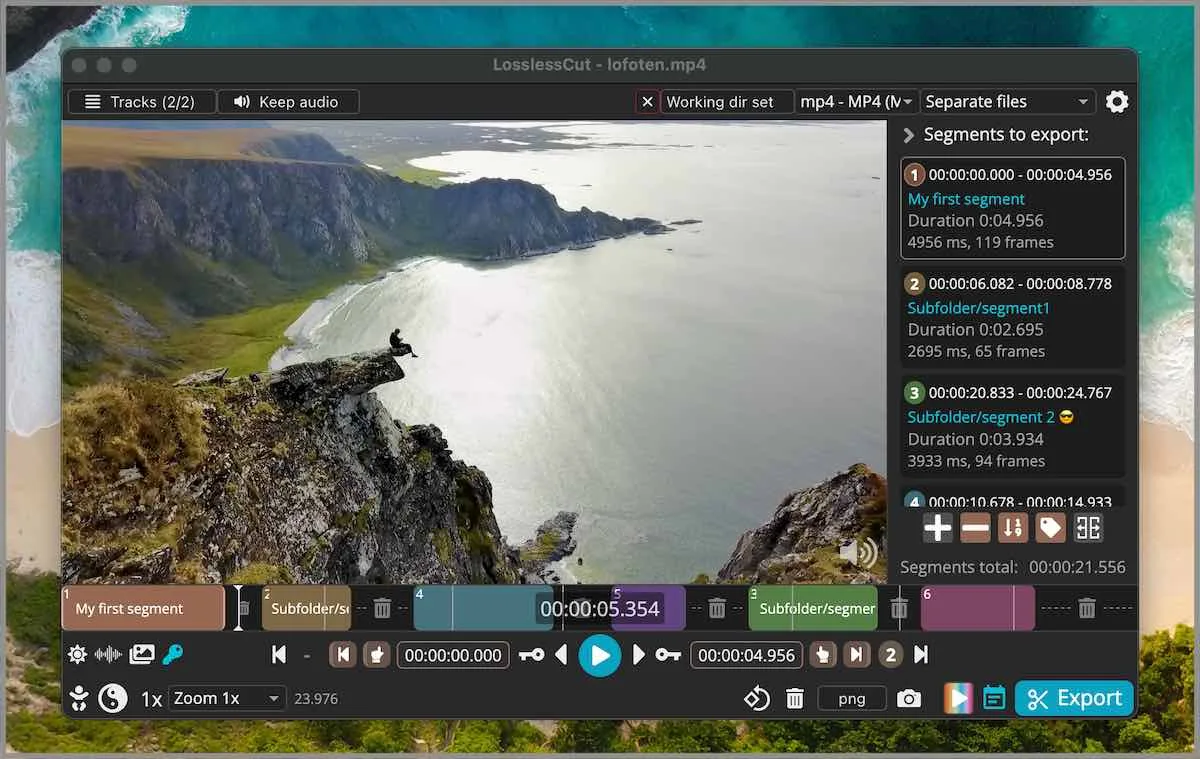
Default cut is keyframe-aligned codec copy. Extra frames can remain at the in-point. Smart cut is experimental: smart cut. Keyframe detail: keyframe cuts. Merge: merge segments. The app is not an NLE. FAQ and issue 976 say segments on a timeline, export those portions. Crop honesty: README lists lossless crop; FAQ still groups crop, resize, and stretch with lossy work and points at issue 372. Crop URL: video cropper.
CLI and HTTP API exist and stay basic. Issues: lossless-cut issues. Docs: docs/index.md. Guides: guides. Home: video trimmer home.
Updates, uninstall, and extra copies
Update on the same channel you used. Replace a 7z folder. Replace a dmg drag. Replace an AppImage. Let a store listing update inside the store. Uninstall extras so two copies do not fight. Privacy for these notes: privacy. Advertising: advertising disclosure. Editorial: editorial policy. Contact: contact.
Compare HandBrake if compress is the real job: versus HandBrake. Effects: versus Shotcut. Migrate: move off re-encoders. Trim keep URLs: trim video, mp4 trimmer, video cutter.
First proof after a safe fetch
Open a file you can waste. Mark in and out. Export. Play the file in a player you already have. That is the proof the bytes were the app, not a wrapper. Keep the original camera file until that export looks right. Then delete Desktop helpers that reused the name.
The desktop build bundles FFmpeg. There is no .NET runtime. There is no account on the GitHub build. Cuts stay local.
Safe fetch steps:
- Open mifi/lossless-cut releases.
- Take the 7z, dmg, or AppImage that matches the OS. Skip APPX and PKG.
- Skip Softonic, CNET, and countdown wrappers.
- Launch, cut a throwaway file, and save the export to a folder you named.
Frequently asked questions
Where do I download it safely?
Use GitHub Releases. Skip Softonic, CNET, and random mirrors. Related: download safely.
Is LosslessCut open source?
Yes. License is GPL-2.0. Source is mifi/lossless-cut. No account is required to run the GitHub build.
Does it need an account?
No on the GitHub build. App Stores may use the store account. Cuts stay on the PC. Related: guides.
Are the Store listings official?
README badges Microsoft Store 9P30LSR4705L and Mac App Store id 1505323402. They lag GitHub. Supporting only. Pick one channel.
Can I trust a Softonic download?
Skip Softonic, CNET, and countdown wrappers. Match repo mifi/lossless-cut. Files stay on GitHub.